

How this page makes money. Some links on this page are affiliate links: if you buy through them we may earn a commission (on this page: ALLPOWERS). Brands that pay us nothing are included wherever leaving them out would make a comparison less useful.
How many watts does a TV use? A modern 55-inch LED set draws 60–120 watts while you are watching, a 65-inch set 85–160 watts, and a 75-inch set 120–250 watts. At five hours a day a 55- or 65-inch set uses 300–800 watt-hours, or roughly 110–290 kWh a year, and a 75-inch set more. The figure printed on the back of the set is the maximum it can pull, and the two numbers are rarely close.
The three numbers, and which one matters
A television has three wattage figures attached to it, used for three different decisions. Mixing them up is where sizing goes wrong.
| Number | Typical value | What it is for |
|---|---|---|
| Running watts | 60–160W | Inverter output, and the runtime arithmetic |
| Startup surge | None worth sizing for | Nothing. A screen is not a motor. |
| Daily energy | 300–800Wh | Battery capacity and your electricity bill |
Use the daily figure to size a battery and the running figure to size an inverter, though for a television that second requirement is so low it is almost never the constraint. To convert your own watts into kilowatt-hours, multiply by the hours you watch and divide by 1,000, or use the watts to kWh calculator.
Why the rating plate is not your answer
The wattage stamped on the back of a television is a maximum: the draw with the backlight at full and every port in use. Sets are rarely run that way, and on a large modern panel the gap between that figure and normal viewing is substantial.
The television equivalent of a fridge’s duty cycle is not cycling at all. It is how many hours the set is on, and how hard the panel is being driven. The second is under your control and moves the number more than people expect.
- Picture mode. On an LED or QLED set the backlight is the load. Vivid and Dynamic run it near maximum; Standard, Cinema, Eco and Filmmaker run it far lower. Moving between the extremes can change consumption by close to half.
- Screen area, not diagonal. Power tracks panel area. A 65-inch screen is about 40% larger in area than a 55-inch one, and a 75-inch screen roughly 85% larger, which is why the last upgrade costs more than the extra inches suggest.
- What is on screen, if the set is OLED. An OLED has no backlight; each pixel makes its own light, so a dark film draws a fraction of what a bright sports broadcast draws on the same panel. A single figure for an OLED is close to meaningless, which is why the ranges below are wide.
- HDR content. HDR targets much higher peak brightness and often overrides the eco setting you chose. If you watch a lot of it, use the top of the range.
- The ambient light sensor. A set that dims itself in a dark room genuinely uses less. It is usually on by default and worth leaving on.
Do not multiply the rating plate by your viewing hours. It is the most common error on this question, and it produces a daily figure two or three times too high. Measure the set, or use the ranges below.
How many watts does a TV use, by size and panel type
The daily and annual columns assume five hours of viewing a day, the same assumption the yellow EnergyGuide label uses, plus a small allowance for standby. Adjust for your own hours.
| Television | Running watts | Per day at 5 hours | Per year |
|---|---|---|---|
| 24–32-inch LED | 20–50W | 100–250Wh | 40–95 kWh |
| 40–43-inch LED | 40–80W | 200–400Wh | 75–150 kWh |
| 50–55-inch LED or QLED | 60–120W | 300–600Wh | 110–220 kWh |
| 55-inch OLED | 80–150W | 400–750Wh | 145–275 kWh |
| 65-inch LED or mini-LED | 85–160W | 425–800Wh | 155–295 kWh |
| 65-inch OLED | 100–190W | 500–950Wh | 180–350 kWh |
| 75–85-inch LED | 120–250W | 600–1,250Wh | 220–460 kWh |
| Plasma, 50–60-inch | 250–450W | 1,250–2,250Wh | 455–820 kWh |
| CRT, 27–32-inch | 80–150W | 400–750Wh | 145–275 kWh |
| 12V portable, 19–24-inch | 15–30W | 75–150Wh | — |
The plasma figures are the ones that surprise people. A 55-inch plasma from the early 2010s can draw more than three times what a 65-inch LED draws today, for a smaller picture. If one has survived in your house, it is quietly the largest entertainment load you own.
The 12V figures matter if you are outfitting a van. A DC television runs straight off the battery with no inverter in the path, saving both the conversion loss and the inverter’s own idle draw.
Startup surge: a television does not have one
Refrigerators, pumps and air conditioners spike to several times their running wattage when the motor starts, and that spike is what decides the inverter. A television has nothing equivalent. It is a solid-state load fed by a switching power supply, and while there is a brief inrush as the capacitors charge at switch-on, it lasts milliseconds and any competent inverter rides through it.
So do not build headroom for a surge that is not there. A power station rated for 300W continuous will run any consumer television made in the last decade. The output rating you need is set by whatever else you plug in alongside it, not by the screen. Two things matter more:
- Waveform. Use a pure sine wave inverter. Nearly every portable power station is one, but cheap cigarette-lighter inverters often are not, and a modified sine wave can buzz through speakers and run the set’s power supply hot.
- The inverter’s own idle draw. Switching on the AC output of a power station costs 5–15W before you plug anything in. Against a 40W portable set that overhead is a quarter of your consumption again.
For a 12V system rather than a wall outlet, the watts to amps calculator gives you the DC current to size the fuse and the cable. A 110W set through a 12V inverter pulls roughly 10 amps on the battery side.
Standby, and the box underneath the TV
Standby on a modern television is small. Most sets sit under a watt when off, which is about 9 kWh and a dollar and a half a year. Quick-start and always-listening voice modes raise that to a few watts, so disabling them saves five to seven dollars a year in exchange for a slower boot.
The genuine cost is usually not the television. It is everything stacked underneath it:
- Cable or satellite DVR: 15–35W, and many run at close to that around the clock rather than truly sleeping. At 25W continuous that is about 220 kWh a year, about as much electricity as the 65-inch television it is feeding.
- Game console in rest mode: roughly 10–15W idling, and 100–200W while you are actually playing.
- Soundbar: 15–50W in use. An AV receiver driving real speakers is more like 50–150W.
- Streaming stick: 2–5W. Not worth thinking about.
Unplugging the television at the wall is not the win. It saves around a dollar a year. Retiring an always-on DVR, or letting a console actually power down, saves twenty to forty times as much for the same effort. There are more items like that in our guide to cutting an electricity bill.
How long a power station really runs a television
Take the rated capacity, subtract about 13% for inverter and conversion losses, then divide by the draw. The columns are a 32-inch set at 40W, a 65-inch set at 110W, and a 75-inch set with soundbar and streaming box at 220W.
| Capacity | Usable | 32-inch, 40W | 65-inch, 110W | 75-inch setup, 220W |
|---|---|---|---|---|
| 300Wh | ≈260Wh | 6.5 hours | 2.5 hours | 1 hour |
| 500Wh | ≈435Wh | 11 hours | 4 hours | 2 hours |
| 1,000Wh | ≈870Wh | 21 hours | 8 hours | 4 hours |
| 2,000Wh | ≈1,740Wh | 43 hours | 16 hours | 8 hours |
| 3,600Wh | ≈3,130Wh | 78 hours | 28 hours | 14 hours |
On the numbers. Capacity and output are manufacturer specifications. Expect 80–90% of rated capacity in real use after inverter losses, and less in cold weather.
Two honest caveats. The 32-inch column is optimistic, because a flat 13% loss does not capture the inverter’s fixed idle draw, which is a large share of a 40W load; knock 10–15% off that column. And the last column at 300Wh is the wrong tool for the job. An hour of television with nothing left for phones or lights is not a use of a battery. If that is the unit you own, watch on a tablet.
Working from a deep-cycle battery instead? Convert first: a 100Ah 12V battery is about 1,200Wh on paper, of which LiFePO4 gives you about 80% (roughly 960Wh) at a sensible depth of discharge and lead-acid about half before you start damaging it. The amp hours to watt hours calculator does the conversion.
Which power stations suit a TV
The runtime table above is by capacity. To work backward from the evening you want, multiply hours by watts and divide by 0.87 for inverter losses. A five-hour evening on a 65-inch set is 5 × 110 = 550Wh, and 550 ÷ 0.87 comes to roughly 630Wh to buy, so even the smallest unit below, at 768Wh, covers it with margin. The table shows three power stations at three sizes, with capacity and AC output as each maker lists them, and runtimes worked out with the same 110W figure and 13% loss as the runtime table above.
| Unit | Capacity | AC output | 65-inch TV at 110W | List price |
|---|---|---|---|---|
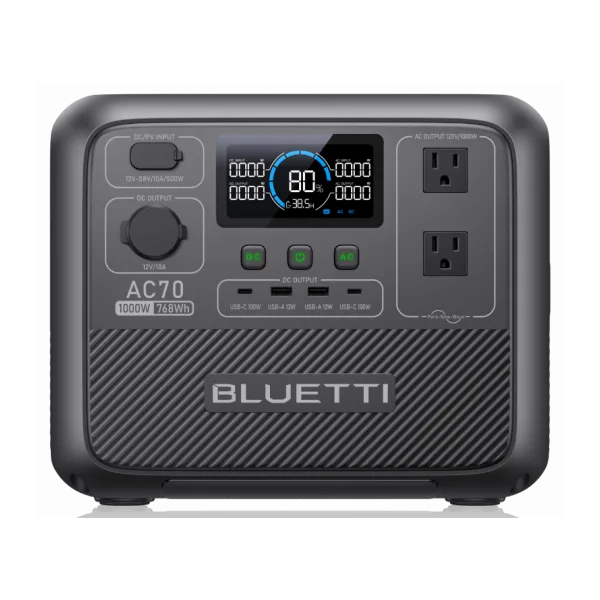 BLUETTI AC70 BLUETTI AC70 | 768 Wh | 1,000W | about 6 hours | $359 |
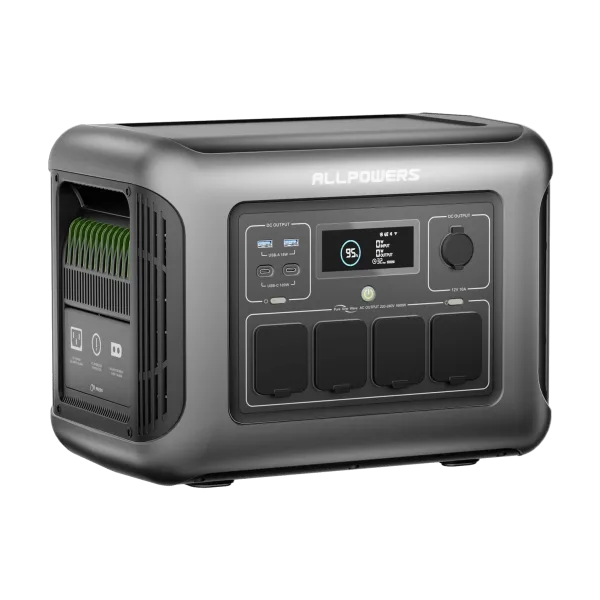 ALLPOWERS R1500 LITE ALLPOWERS R1500 LITE | 1,056 Wh | 1,600W | about 8 hours | $389 |
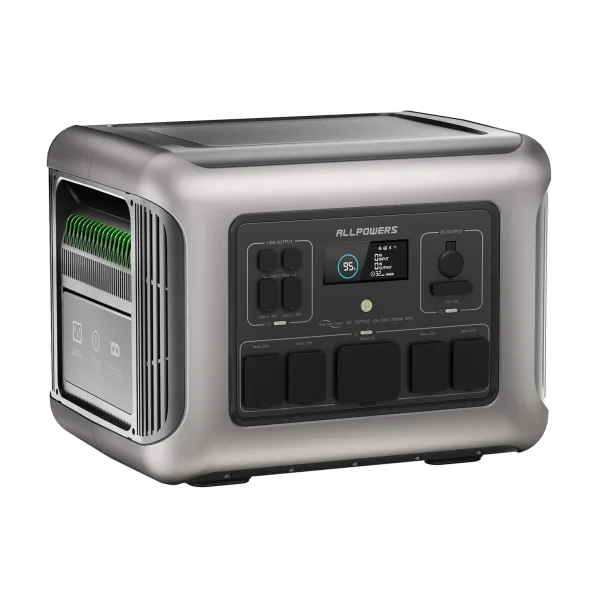 ALLPOWERS R2500 V2 ALLPOWERS R2500 V2 | 1,920 Wh | 2,500W | about 15 hours | $659 |
Output does not separate them. Every inverter here is rated at 1,000W or more, about nine times what the set draws, so the choice comes down to hours and price. A game console changes the arithmetic more than people expect. In play it draws 100–200W on top of the set, so the pair is 210–310W, and a 1,056Wh unit lasts roughly three to four and a half hours instead of eight.
Is a TV worth putting on battery backup?
Yes, but never as the reason you buy the battery. A television is one of the cheapest useful things to keep running in an outage, and an evening of it fits inside a 1,000Wh unit with room to spare. If you have already sized a battery around the refrigerator, the television is close to free to add.
What it should not do is drive the purchase. The sensible order of priority is phones, the router, medical equipment, the fridge, then lights, and the screen after all of those. Buy for that list and the television falls out of it automatically. Buy a 300Wh unit because you wanted to watch something and you have solved no part of the problem.
Be clear-eyed about what a screen gives you in a multi-day outage, too. The information you actually want arrives on a phone or a radio for about 5W. A 150W television is comfort, not utility, which is a fine reason to power it — particularly with children in the house — as long as you budget it as comfort. For the fixed-installation side of the question, see home battery backup.
How to measure your own set in one evening
Every figure above is a range for a reason. Your television, in your living room, at your brightness setting, is knowable for about $25 and one evening.
- Buy a plug-in energy monitor, the type that sits between plug and outlet and reads both instantaneous watts and cumulative kilowatt-hours.
- Note the live wattage during a normal program, not a menu screen. Menus are bright white and read high.
- Cycle the picture modes on the same content and write down each figure. This is the most useful two minutes of the exercise.
- Reset the counter, watch a completely normal evening, then read the kWh total and multiply by 1,000 for watt-hours.
- Leave it running overnight with the set off to capture standby, then repeat for the DVR and the console.
That replaces every estimate here with a real number, and it usually reveals that the set is not the problem.
What a television costs you per year
At a US average residential rate of roughly 17 cents per kilowatt-hour, and five hours of viewing a day, the annual running cost falls straight out of the table above:
- 32-inch LED at 65 kWh: about $11 a year
- 55-inch LED at 165 kWh: about $28 a year
- 65-inch LED at 220 kWh: about $37 a year
- 75-inch LED at 330 kWh: about $56 a year
- 55-inch plasma at 600 kWh: about $102 a year
- An always-on cable DVR at 220 kWh: about $37 a year, on top of any of the above
Against a typical household bill a modern television is a minor line item, and replacing one to save electricity almost never pays back. The two exceptions are a surviving plasma, worth retiring on running cost alone, and a set left permanently in Vivid mode, which is a free fix. Substitute your own rate and hours, and see how many watts it takes to run a house for where the screen sits against everything else.
Frequently asked questions
How many watts does a TV use?
A modern LED television uses 60–120 watts at 55 inches, 85–160 watts at 65 inches, and 120–250 watts at 75 inches. OLED sets sit slightly higher and vary with what is on screen. At five hours a day a 55- or 65-inch set uses roughly 300–800 watt-hours, or 110–290 kilowatt-hours a year; a 75-inch set uses more.
How many watts does a 65 inch TV use?
Around 85–160 watts for an LED or mini-LED panel, and 100–190 watts for a 65-inch OLED. The spread comes almost entirely from picture mode and content brightness. Vivid mode with HDR content sits at the top of the range; Filmmaker or Eco mode with ordinary programming sits near the bottom.
Will a 1,000Wh power station run a TV?
Comfortably. A 1,000Wh unit runs a 65-inch television for about eight hours after inverter losses, or a 32-inch set for about 21 hours. Continuous output is never the limit here, because a television has no startup surge; almost any power station with a 300W or higher inverter will run one.
Do TVs use a lot of electricity on standby?
No. Most modern televisions draw under a watt when off, which is about $1.50 a year. Quick-start and voice-assistant modes raise it to a few watts, so disabling them saves five to seven dollars a year. The cable box or DVR underneath is usually the bigger standby load by a wide margin.
Does an OLED use more power than an LED TV?
Usually a little more at the same size, and much more variably. An LED set’s backlight draws roughly the same regardless of the image, while an OLED lights each pixel individually, so a dark film can draw far less than a bright sports broadcast on the same screen. Budget for the top of the range if you watch bright HDR content.
How much does it cost to run a TV for a year?
About $28 a year for a 55-inch LED and $37 for a 65-inch, assuming five hours a day at 17 cents per kilowatt-hour. A 75-inch set is nearer $56, and an older plasma can pass $100. Fewer hours, a lower backlight setting or a cheaper electricity rate all scale those figures down proportionally.
Can I run a TV on solar?
Easily, with a battery in between. A television is a small, predictable load, so 200–300W of panel and 500–1,000Wh of storage keeps an evening’s viewing going indefinitely in decent conditions. In a van or camper, a 12V television avoids the inverter entirely and cuts the draw by another 10–15%.
Next step. Once you have a real daily figure for the television and everything under it, the power station finder narrows the field to power stations that meet both the capacity and the output you need.